Building Spendflo's Agent Builder
Designed the Agent Builder inside Flo AI: how a team describes an agent, configures its instructions and limits, tests it, deploys it and traces every run, reusing Spendflo's existing product patterns end to end.
- Role
- Product Designer
- Timeline
- 2 weeks
- Tools
Context
Six days for a small data request.
Customer requests kept landing in Slack, and most were small: a question about their own data, a view the dashboard didn't offer. Getting back to the customer took up to 6 days.
No shared context on org data
Nobody in the chain shared context on the organization's data. Each function saw only its own slice, so every request had to be re-explained at each handoff, and no one could answer it alone.
Can I see license usage by team? It's not in the dashboard.
New customer request: license usage by team. Can we scope it?
This doesn't need solutioning. Engineering can pull it.
Built the query, sharing the output.
Here's the data you asked for.
The work was small. The days were spent waiting. With an agent, the customer asks Flo and gets the answer in minutes.
Why now
Being agentic is now a prerequisite for customers and the market, not a differentiator. Spendflo's use case fits: small, repetitive requests answerable from data the product already holds. The data existed. The shared context to use it didn't.
My role
Flo AI already answered questions. Agent Studio is the next step: teams build agents that do the work on their own. I led the agent building experience in a team of three, from describing an agent to checking what it did.
Competitors
Three agent builders, studied side by side.
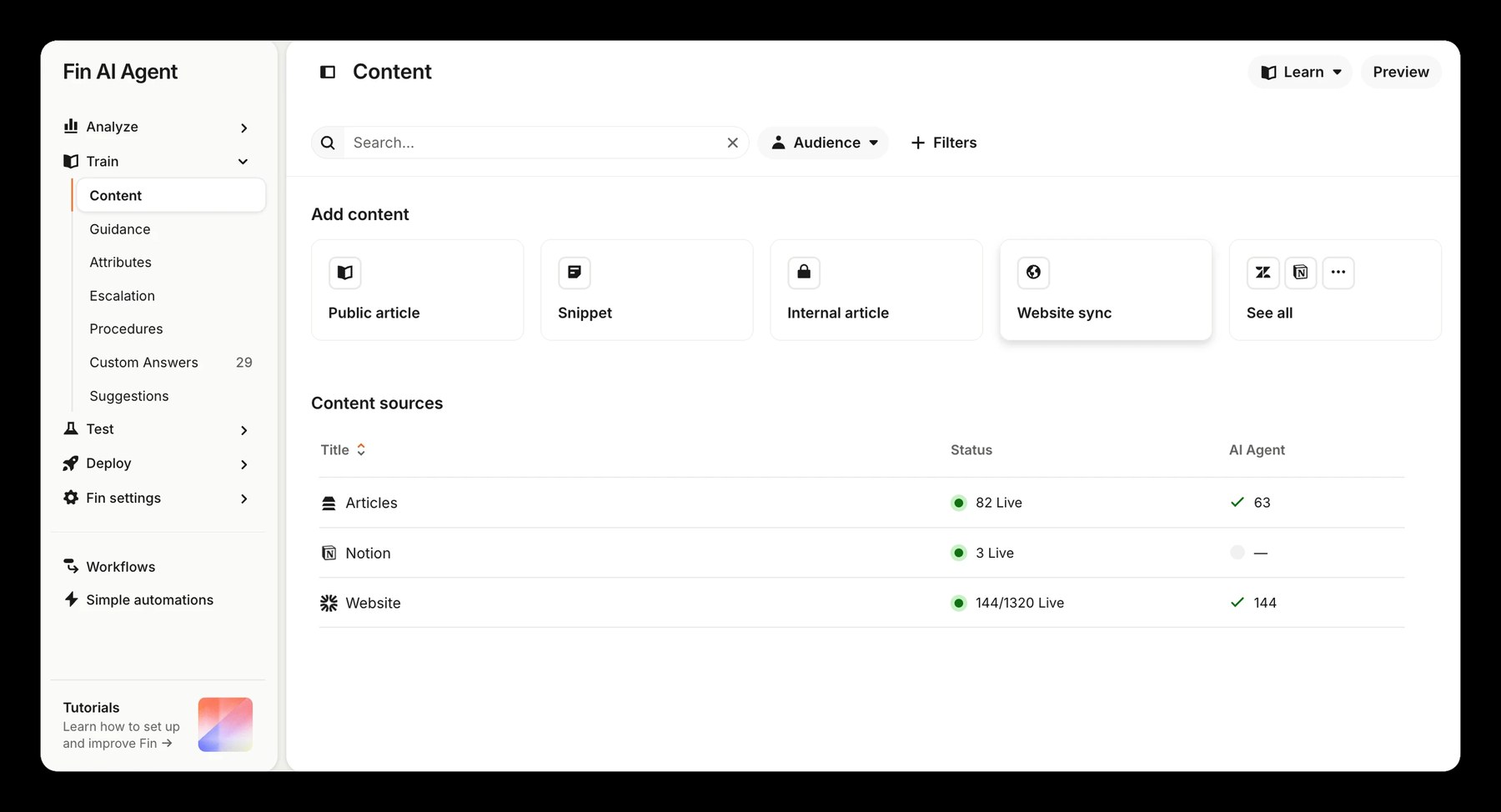
Before designing, I studied three agent builders: Fin (Intercom, support), Rox (sales) and CrewAI (multi-agent automations). Three questions:
- How do you create an agent?
- How do you shape what it does?
- How do you check what it did?
A lifecycle in the navigation
- Lifecycle
- Analyze, Train, Test, Deploy in the left nav
- Structure
- Content and behavior on separate pages under Train
- Content
- Each knowledge source with live counts
- Guidance
- Grouped by style, clarification and escalation, with example rules as chips
Side by side
Train it on content and guidance
Pick a template or start a custom agent
Describe the automation to a Studio Assistant
Guidance rules grouped by purpose
Instructions written as text with variables
Task, role, goal and backstory per agent
A Test stage in the navigation
Not shown in the screens I studied
Run it and watch the Output
Analyze
Run details with Result and Trace
A timeline of every event and its state
- A visible lifecycle
- Behavior grouped by purpose, with starter examples
- Ready-made templates sorted by category
- Chat docked beside the work
- Building through chat
- Every step traced with timing
- The visible lifecycle
- Templates
- The step-by-step trace
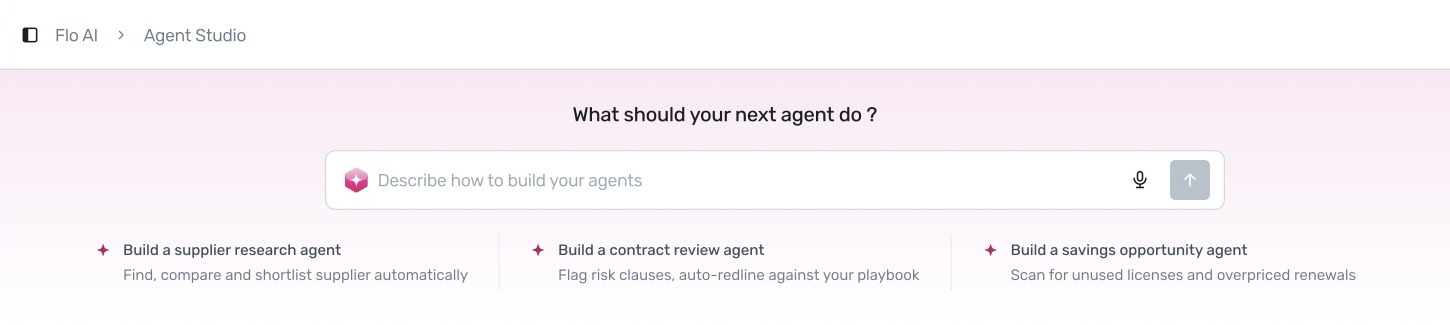
Start from a sentence in procurement language, keep limits as visible as abilities, and make the trace readable without being a developer.
Ideation
Listening first, then deciding what to build.
Design notes
What we wrote down after hearing out customers and our internal teams, and the decisions that followed.
"where do I
even start?"
→ let them just
describe it
"will it hold up
with real data?"
→ test scenarios
before deploy
every company has
its own rules
→ agent reads
THEIR policies
"what did it
actually do?"
→ show the steps
+ the proof
Customers wanted agents that are easy to create, do the job and can be tested before deploy.
Easy to create: three ways in (describe it, start from a template, or write it from scratch), so nobody starts from a blank page.
Test before deploy: saved scenarios and a persona chat test an agent across conditions, not just the happy path.
A knowledge base for policies: like project knowledge in ChatGPT and Claude, teams upload what an agent should act on.
Trust: every result shows its evidence, and every run opens step by step, from input to each tool call to output.
Where it landed: the structure
- About
- Instructions
- Knowledge Base
- Connected Tools
- Boundaries & Voice
- Model
↑ the brief + its limits
- Persona chat
- Rate responses
- Saved scenarios
- Run one or all
↑ try it before it's trusted
- Trigger
- Permission
- Delivery
- Run limits
↑ when, who, where
- Runs list
- Input
- Execution trace
- Output
↑ proof for every run
Configure
An agent needs more than instructions.
Customers wanted control over everything an agent sees, uses and does, so configuration is split into six sections on one tab.
About
Name, description, version, trigger and last run, with the agent's overview for the month on top.
Instructions
The brief the agent follows, in plain language with @variables.
Knowledge Base
The documents and policies the agent reads, such as a pricing benchmark report or a vendor master list, with type, date added and who added each one.
Connected Tools
Connectors like Asana, Atlassian and Slack, with authorization level and status.
Boundaries & Voice
Voice, never-do rules, a spend threshold and when to hand over to a person, in their own section rather than buried in a prompt.
Model
Which model runs the agent. It sits last in the list, after everything the agent can see, use and do.
Test
Trust it before it runs.
The Test tab has two halves.
- Left pane
- A chat with the agent as a chosen persona, like a procurement expert. Rate each response good or bad, with a comment.
- Right pane
- Saved scenarios, like renewal under 30 days. Filter by pass, fail or all, and run one or all together.
Deploy
Decide when, who, and where.
Deploy is four short groups: the trigger (for example weekly on Monday at 9 AM), permission (who can run the agent and who is notified), delivery (results go to a Slack channel), and run limits (a maximum number of runs per day, with an alert when it is exceeded).
Trace
Every run, explained.
Every run opens step by step: input, each tool call with its timing, and the output.
Agents in action
Flo meets people where they already work.
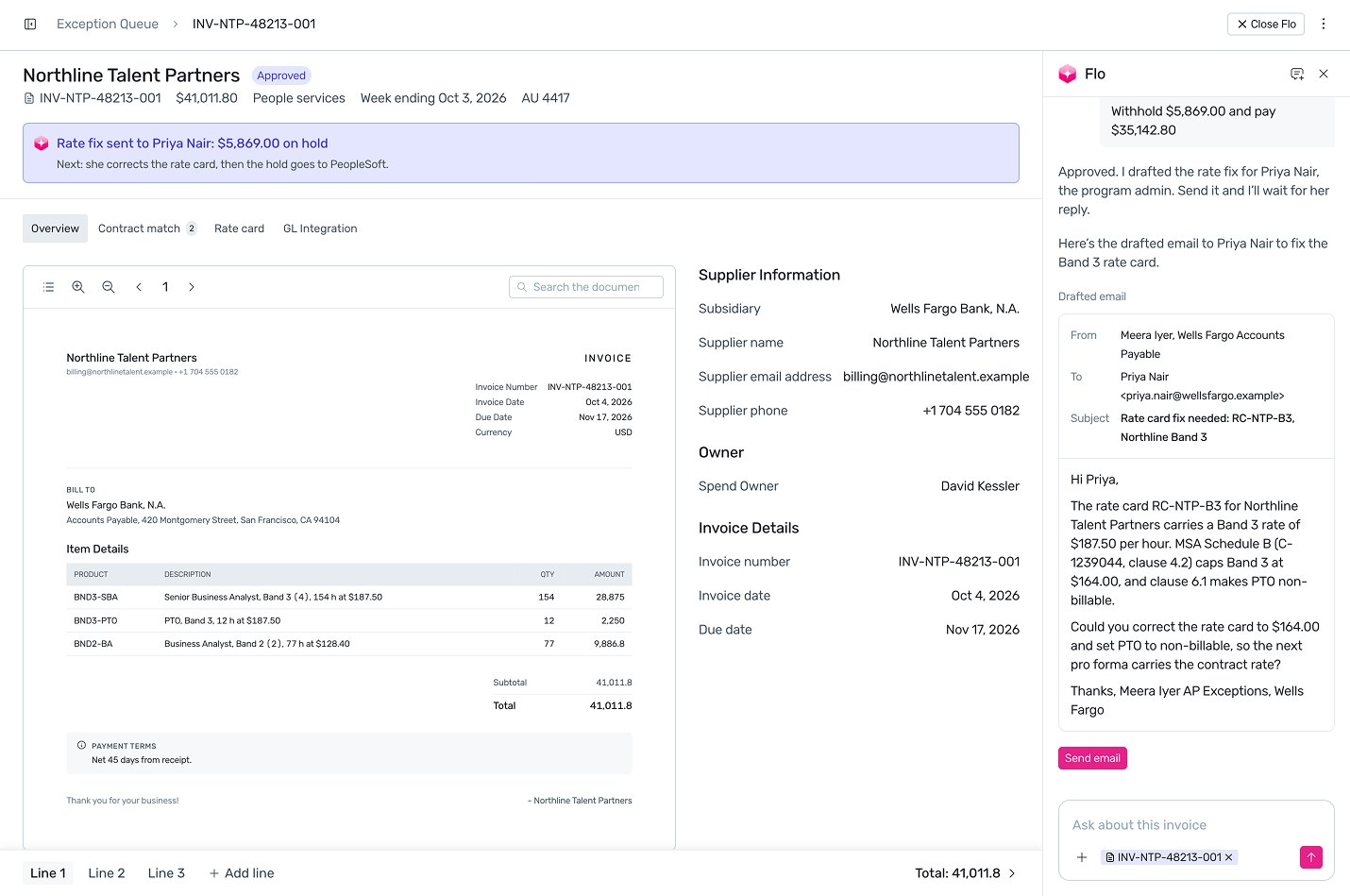
Full-screen chat
Ask anything in plain words. Flo drafts the work and waits for your approval.
Docked side panel
Opens beside the record you are on, already knowing its context.
Inline suggestions
Fills in fields as you work, with one-click Apply and the reason why.
Outcome
What it delivered.
Takeaways
My learnings, and what I take into the next project.
Visibility removed doubts
Early on, people doubted what the agent was doing behind the scenes. Two things fixed that.
Thinking steps

It just says done. How do I know what it actually did?
Now the agent shows each step as it works: what it's reading, which tool it's calling, what it decided.
Source links

Where did this number come from? I can't send it to a vendor without checking.
Every claim now links back to its source, so you can open it and check it yourself.
Limits made the boundaries clear
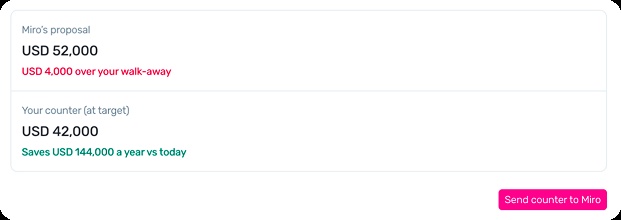
People also needed to know what an agent could and couldn't do. Limits made that explicit: it holds at the walk-away price and waits for a person to send.
Limits

What stops it from emailing a vendor something I didn't approve?
You set its limits: what it must never do, a spend threshold, and when it hands over to you. You always know what it can and can't do.
A nudge beat the blank screen
An empty form left people stuck before they created anything. Starting from a sentence, with starter agents underneath, got them moving.
Getting started

I don't know where to start. What do I even type here?
Describe what you want in one sentence, or pick a starter agent below and adjust it.